
Narrivelle
Announcement bar
Show short store-wide messages above the header.
Header and footer
Set up clear and responsible announcements
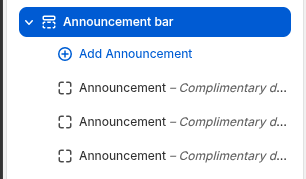
Open Customize → Header → Announcement bar. Narrivelle supports up to six announcement blocks and presents them globally wherever the Header group is used.
Create announcement blocks
Add one block per concise message. Each block has Text and an optional Link. A linked message must lead to a real destination; do not use fake urgency, unavailable offers, or unverifiable countdown claims.
Choose motion carefully
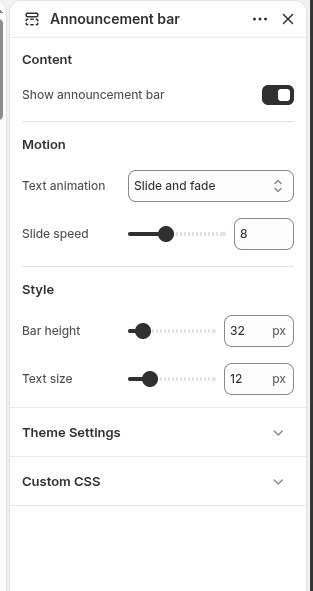
Slide and fade swaps messages; Continuous scroll moves messages right to left. Use only a modest speed and keep essential information available elsewhere, because moving content is harder to read.
Review accessibility and mobile
Test a long message, a linked message, keyboard focus, compact width, and reduced-motion preferences. Narrivelle stops the marquee animation for reduced-motion users.
Settings reference
Use this reference while working in the Theme Editor. Setting names match the Narrivelle controls.
| Theme Editor setting | What it controls | Use and review |
|---|---|---|
| Show announcement | Shows or hides the complete Announcement bar without deleting its blocks. | Turn off temporarily when there is no current message instead of leaving placeholder copy. |
| Announcement animation | Chooses Slide and fade or Continuously scroll right to left. | Use motion sparingly and retain important information in a static location. |
| Slide speed / Marquee speed | Sets the speed control for the selected animation style. | Use a readable pace; only the control relevant to the chosen animation is shown. |
| Bar height / Text size | Sets the visual height and text scale of the announcement bar. | Keep both conservative so navigation remains usable on compact screens. |
| Announcement block → Text / Link | Defines each message and optional destination. | Keep copy concise and verify every link on the storefront. |