
Narrivelle
Header
Configure logo, navigation, account, localization, and sticky behaviour.
Header and footer
Build a dependable global header
Open Customize → Header → Header. This section controls global storefront navigation and appears on every customer-facing route using the Header group.
Set the navigation foundation
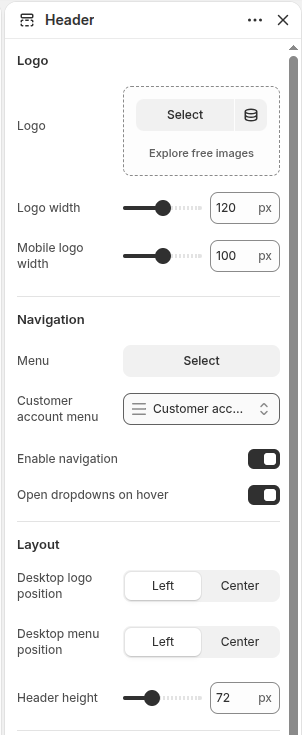
Create the primary menu in Shopify Content → Menus, then select it in Header. Narrivelle supports one, two, and three menu levels. Keep labels short and ensure every parent and child destination is meaningful.
Configure logo and layout
Upload a clear logo, set independent desktop and mobile widths, then choose desktop logo and menu positions. Check the full header at desktop and compact widths with the real menu labels.
Test interactive behaviour
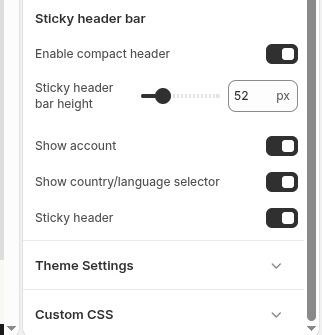
Enable hover disclosure only after testing keyboard navigation and Escape. Sticky and compact navigation should be tested with a long page, long menu labels, account controls, localization, search, and cart.
Settings reference
Use this reference while working in the Theme Editor. Setting names match the Narrivelle controls.
| Theme Editor setting | What it controls | Use and review |
|---|---|---|
| Logo / Logo width / Mobile logo width | Selects the logo and its desktop and compact display sizes. | Use a transparent, high-resolution logo and check that it never crops or overwhelms the navigation. |
| Menu / Customer account menu | Selects the primary navigation and the menu used by Shopify native customer-account surfaces. | If no primary menu is assigned, the theme can use the main-menu fallback where available. |
| Enable navigation / Enable dropdown hover | Shows navigation and optionally opens desktop disclosure on hover. | Keyboard controls remain essential. Test focus, Escape, Back, and touch behaviour. |
| Desktop logo position / Desktop menu position / Header height | Controls the desktop header composition and regular height. | Review the complete header with long labels and at common desktop widths. |
| Enable compact navigation / Compact header height / Sticky header | Controls the smaller scrolling header treatment. | Test scrolling, focus, and anchor destinations; compact mode must not hide critical controls. |
| Show account / Show localization | Shows Shopify-native account entry and country/language controls when eligible. | Availability depends on Shopify store configuration; do not replace unavailable provider surfaces manually. |