
Narrivelle
Brand and favicon
Set the storefront display brand name and browser icon.
Theme settings
Set your storefront identity
Open Theme settings → Brand. These settings affect presentation in selected theme surfaces without changing your official Shopify store identity.
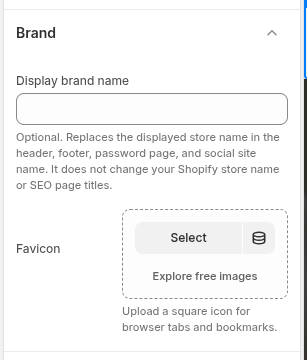
Display brand name
Use Display brand name when you want Narrivelle to show a different storefront label in the header, footer, password page, and social site name. It does not rename your Shopify store or change SEO page titles.
Choose a favicon
Upload a simple, high-contrast square favicon that stays recognisable at a small browser-tab size. Check the result in a new browser tab after saving because browsers may cache favicon assets.
Review global surfaces
Preview the header, footer, password page, and shared links after changing the brand name. Make sure the selected brand is consistent with the logo, policies, and customer-facing store name.
Settings reference
Use this reference while working in the Theme Editor. Setting names match the Narrivelle controls.
| Theme Editor setting | What it controls | Use and review |
|---|---|---|
| Display brand name | Overrides the displayed store name in selected Narrivelle surfaces. | Use a customer-facing brand label only; change the official Shopify store name separately in Shopify admin. |
| Favicon | Sets the small icon used by the browser tab. | Upload a clear square source image and verify in a new tab after saving. |