
Narrivelle
Search settings
Choose how search opens and what predictive results include.
Theme settings
Set up search without obscuring normal results
Open Theme settings → Search. These controls configure the header search behaviour and Shopify predictive-search content.
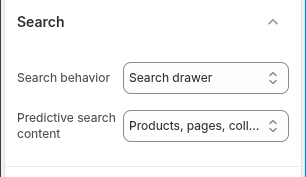
Search behaviour
Choose Search page when customers should land on the full results template, or Search drawer for a faster overlay entry point. Standard search remains a normal Shopify URL so customers can share, bookmark, and revisit results.
Predictive search content
Choose Products only to focus suggestions on merchandise, or Products and content to include matching pages, articles, and other searchable content. Preview common queries and a query with no matching result.
Pair with Search & Discovery
Filters and sort options are configured in Shopify Search & Discovery and returned by Shopify. Do not document or advertise filter values until they are actually configured and verified against the live catalog.
Settings reference
Use this reference while working in the Theme Editor. Setting names match the Narrivelle controls.
| Theme Editor setting | What it controls | Use and review |
|---|---|---|
| Search behavior | Chooses whether the header opens the full Search page or Search drawer. | Use Search page for a full results-and-filters journey; use Search drawer for quick product discovery. Test both a result and a no-result query. |
| Predictive search content | Limits predictive suggestions to Products or includes Products, pages, and other content. | Choose Products only for a merchandise-first store; include content when editorial pages and articles are important destinations. |