
Narrivelle
Social media
Add only the social destinations your store actively maintains.
Theme settings
Connect active social channels
Open Theme settings → Social media. Empty fields do not create a link, so you can keep the storefront focused on channels with current content and support coverage.
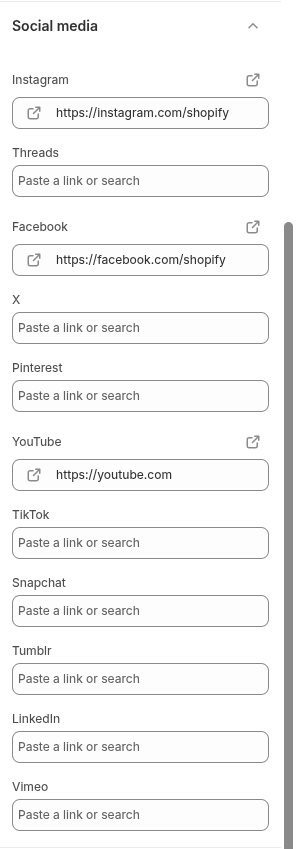
Settings reference
Use this reference while working in the Theme Editor. Setting names match the Narrivelle controls.
| Theme Editor setting | What it controls | Use and review |
|---|---|---|
| Instagram / Threads / Facebook / X / Pinterest | Sets the destination URL for each supported social service. | Enter complete URLs only for profiles that are current and monitored. |
| YouTube / TikTok / Snapchat / Tumblr / LinkedIn / Vimeo | Sets additional supported social destinations. | Leave unused services blank; an empty field does not create a storefront link. |
| Footer social output | The Footer Follow on Shop and social block reads these configured links. | Verify every icon, destination, and accessible name after changes. |