
Narrivelle
Typography
Control the theme-wide reading and navigation type system.
Theme settings
Create a consistent and readable type system
Open Theme settings → Typography. Narrivelle separates heading, body, small-label, and navigation controls so editorial hierarchy and commerce information remain distinct.
Headings
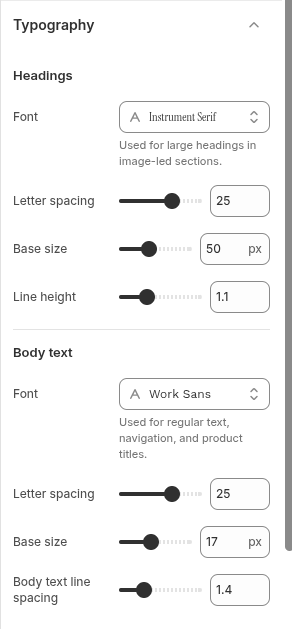
Choose the heading font, then adjust base size, letter spacing, and line height in small increments. Check campaign headlines, long product names, collection titles, and mobile layouts before committing to a display font.
Body text
Set the body font, base size, letter spacing, and line spacing for readable product information, editorial copy, and form content. Avoid using a decorative display font for body text when it weakens readability.
Small labels and navigation
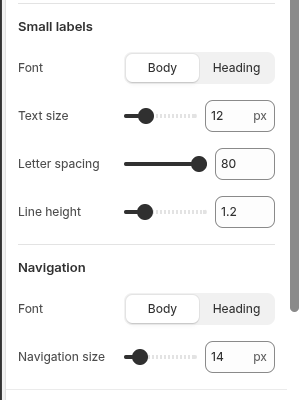
Small labels control compact metadata and control labels; Navigation controls menu font and size. Test all-caps labels, long menu names, input labels, sale states, and 200% browser zoom.
Settings reference
Use this reference while working in the Theme Editor. Setting names match the Narrivelle controls.
| Theme Editor setting | What it controls | Use and review |
|---|---|---|
| Headings → Font | Sets the theme heading font. | Review large campaign headings and long product titles. |
| Headings → Letter spacing | Adjusts spacing between heading characters. | Use small changes; excessive spacing harms reading at mobile sizes. |
| Headings → Base size / Line height | Sets the starting heading scale and vertical density. | Check multi-line headings in hero, product, and collection contexts. |
| Body text → Font | Sets the main reading font. | Prioritise readability for product details, forms, and articles. |
| Body text → Letter spacing / Base size / Line spacing | Controls body-text rhythm and density. | Review long descriptions and 200% browser zoom. |
| Small labels → Font / Text size / Letter spacing / Line height | Styles compact metadata and control labels. | Test sale labels, input labels, and small uppercase text. |
| Navigation → Font / Navigation size | Styles header and menu navigation text. | Check long menu labels, nested navigation, and compact screens. |